
Download Bill Express – Easy Bill Management, Secure Reminders, Free App
Overview
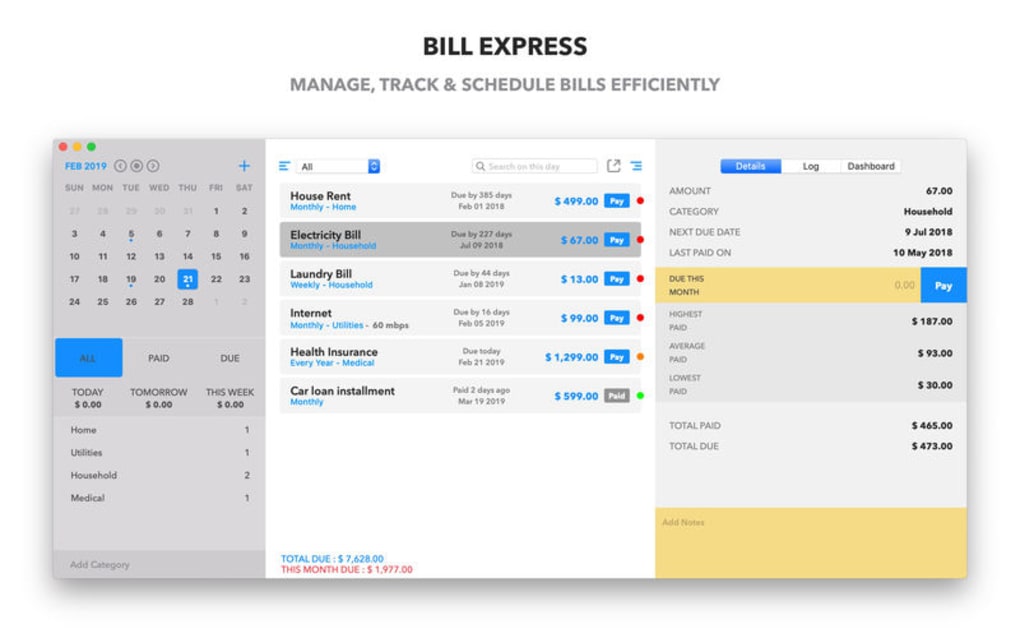
Bill Express is a lightweight, cross‑platform tool designed to eliminate the stress of missed payments. In today’s fast‑paced world, forgetting a utility, credit‑card, or subscription bill can lead to late fees, service interruptions, and a dent in your credit score. Bill Express tackles that problem by gathering all of your recurring and one‑time bills into a single, clean dashboard where you can see due dates, payment amounts, and status at a glance.
The app’s intuitive interface makes it simple for busy professionals, students, and families to add new bills, set custom reminders, and even sync with your calendar. With push notifications, email alerts, and an optional secure vault for storing payment details, Bill Express ensures you never have to scramble for a forgotten invoice again. The free version offers unlimited bill tracking, while premium upgrades add advanced reporting, multiple device sync, and priority support.
Whether you’re on Windows, macOS, Android, or iOS, Bill Express provides a consistent experience that keeps your finances organized without the need for a dedicated accountant.
Key Features that Make Bill Express Stand Out
- Unified Dashboard: All bills appear on a single screen with color‑coded status indicators (upcoming, due today, overdue).
- Customizable Reminders: Choose push, email, or SMS alerts; set reminder intervals (1 day, 3 days, 1 week) to match your workflow.
- One‑Tap Bill Entry: Add recurring or one‑off bills in seconds using a simple form; import CSV files for bulk uploads.
- Secure Payment Vault: Store card numbers, bank account details, or PayPal credentials encrypted with AES‑256; optional biometric lock on mobile.
- Calendar Integration: Sync due dates with Google Calendar, Outlook, or Apple Calendar for seamless schedule management.
- Multi‑Device Sync: Changes made on Windows instantly appear on your iPhone, Android tablet, or Mac, thanks to cloud‑based sync.
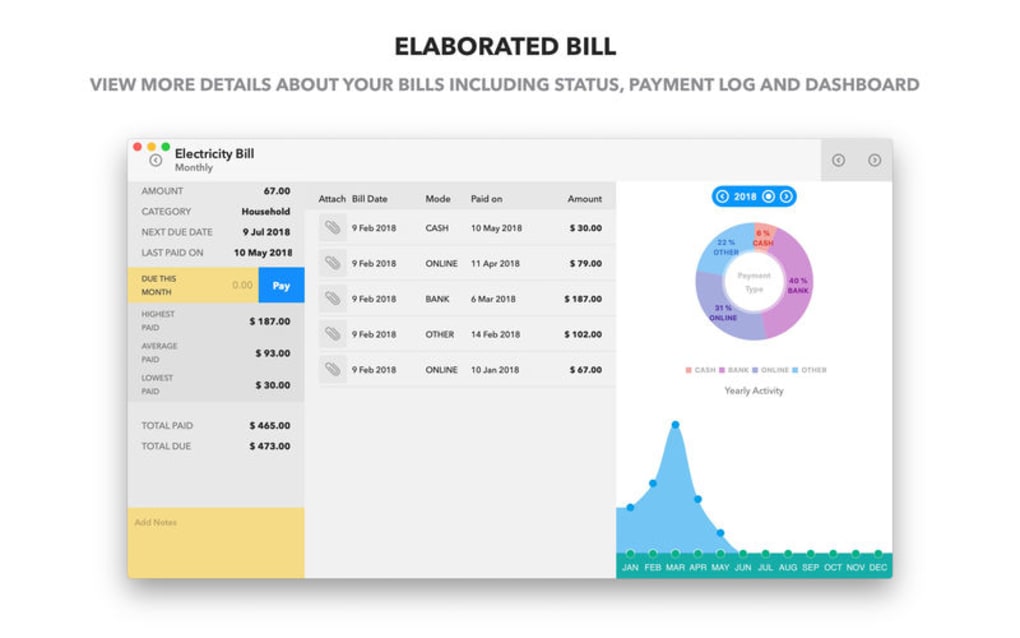
- Analytics & Reports: Visual charts show monthly spending trends, upcoming obligations, and missed payments.
- Offline Mode: Access your bill list without internet; updates sync once you’re back online.
- Free Core Version: Unlimited bill tracking without hidden fees; premium tier adds advanced features for a modest annual subscription.
- Regular Updates: The development team releases security patches and new features monthly, ensuring the app stays secure and current.
Installation & Usage: Step‑by‑Step Guide
Downloading the App
To begin, visit the official Bill Express website or your device’s app store (Google Play Store for Android, Apple App Store for iOS, Microsoft Store for Windows, or Mac App Store for macOS). Click “Download” and follow the on‑screen prompts. The installer is signed with a valid digital certificate, guaranteeing a secure, malware‑free download.
First‑Time Setup
After installation, launch Bill Express. You’ll be greeted by a brief onboarding wizard:
- Create an Account: Provide an email address and a strong password; enable two‑factor authentication for added security.
- Set Your Time Zone: This ensures reminders fire at the correct local time.
- Import Existing Bills: You can manually add bills or import a CSV file exported from your bank or accounting software.
- Choose Notification Preferences: Select push, email, or SMS alerts, and define how many days in advance you want to be reminded.
Managing Bills
The main dashboard displays a list of upcoming bills sorted by due date. Click any entry to open the detail view, where you can:
- Edit the amount, due date, or recurrence pattern.
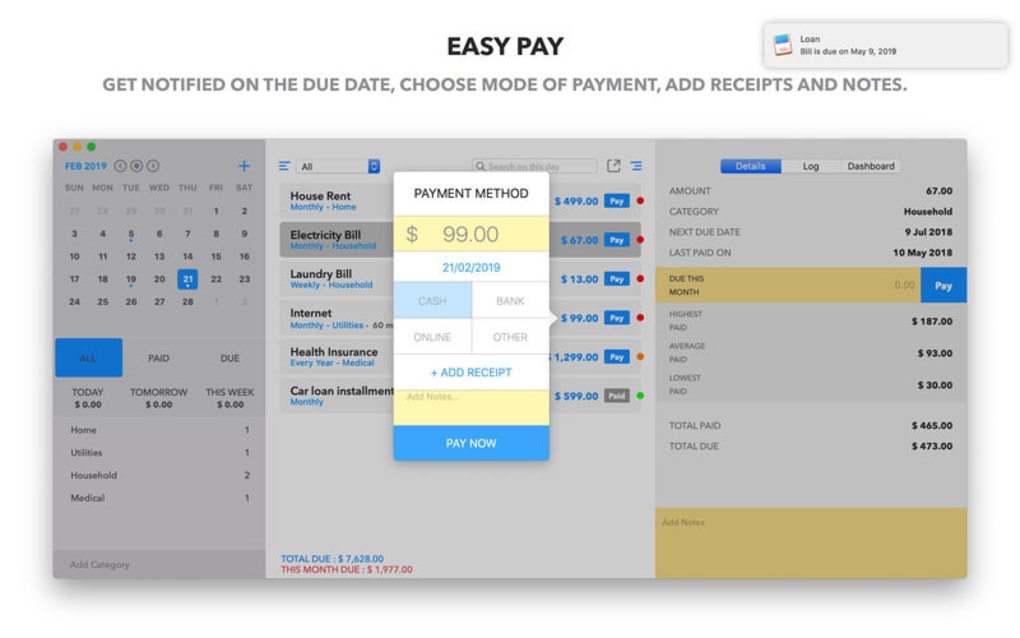
- Attach a receipt or PDF invoice for reference.
- Mark a bill as “Paid” with a quick tap; the status changes to green and the next occurrence is automatically scheduled.
- Set a custom reminder tone or vibration pattern on mobile devices.
Syncing Across Devices
Once you’ve logged in on a second device, the app will prompt you to enable cloud sync. All changes sync in real time via encrypted TLS connections, so your data remains private while being instantly available on every platform you use.
Compatibility, Pros & Cons, and Frequently Asked Questions
Compatibility
Bill Express runs natively on the following operating systems:
- Windows 10, 11 (64‑bit)
- macOS 11 (Big Sur) and later
- Android 8.0 (Oreo) and later
- iOS 13 and later (iPhone, iPad)
Pros and Cons
- Pros:
- Free core version with unlimited bill tracking.
- Highly customizable reminders reduce missed payments.
- Secure vault protects sensitive payment information.
- Cross‑platform sync keeps data consistent.
- Intuitive UI suitable for users of any technical level.
- Cons:
- Premium features (advanced analytics, multi‑user accounts) require a subscription.
- Push notifications on iOS may be delayed if “Background App Refresh” is disabled.
- Desktop version lacks a native macOS menu bar integration (uses standard window controls).
FAQ – Your Bill Express Questions Answered
Is Bill Express really free?
Yes, the core app is completely free. You can add unlimited bills, set reminders, and sync across devices without paying. A premium tier is optional and adds features like detailed spending reports and multi‑user collaboration.
How secure is the payment vault?
The vault uses AES‑256 encryption, and all data is stored on secure cloud servers that comply with GDPR and CCPA. Two‑factor authentication and biometric locks (fingerprint/Face ID) add an extra layer of protection.
Can I import bills from my bank?
While direct bank integration is not currently offered, Bill Express supports CSV import. Export your transaction list from your bank’s portal and upload it; the app will automatically detect recurring payments and suggest bill entries.
Does the app work offline?
Yes. All bill data is cached locally, allowing you to view, add, or mark bills as paid without an internet connection. Changes sync automatically once you reconnect.
How do I cancel the premium subscription?
You can cancel at any time from the “Account Settings” page within the app. The cancellation takes effect at the end of the current billing cycle, and you will retain premium features until that date.
Overall Verdict: Bill Express delivers on its promise to keep you on top of payments with a sleek interface, robust reminder system, and strong security. The free tier is generous, making it a valuable addition to any personal finance toolkit.
Conclusion & Call to Action
Missed bill payments are a common source of financial stress, but with Bill Express you gain a reliable ally that centralizes every obligation, sends timely alerts, and safeguards your payment details. The app’s cross‑platform availability means you stay organized whether you’re working from a Windows laptop, a Mac desktop, or on the go with Android or iOS. While the premium subscription unlocks deeper insights, the free version already offers everything a typical user needs to avoid late fees and keep a clean credit record. Ready to take control of your finances? Download Bill Express now and experience the peace of mind that comes from never missing a bill again.







